First off, what is proofreading?
Proofreading means different things to different people. For publishers, proofreading is the final read through before a book is published. It’s usually done on the PDF or hard copy after the designer has laid out the text.
But proofreading can also mean the final read through of your thesis before submission, or double checking an email before hitting ‘send’.
Can I proofread my own work?
Yes, you can. You don’t always have the time or luxury to pay for a proofreader so here are two tips to help you proofread your own work: listening and checklists.
Listening to your work
Read your work out loud, or listen to it. Reading out loud or listening to your computer read your text forces you to slow down and pay attention. I like to use the text-to-speech option in Word. Computers don’t skip any words, though the accent can be quirky at times.
When you listen to your text, you’ll pick up all sorts, like:
- repeated words (Paris in the the springtime)
- words that are spelled correctly but are incorrect for the context (You can led a horse to water)
- words with numbers in them
- words spelled with a capital I instead of a lower case l, and vice versa
- sentences that are clunky or too long
- punctuation that is in the wrong place
In Word 365, you can turn on text-to-speech in two ways.
1. Add Speak to the quick access toolbar. Find out how here.
The button looks like this:

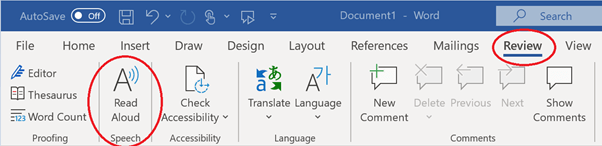
2. Use Read Aloud in the Review ribbon (you may have to install a language pack in your Windows settings).
Use checklists
When I proofread a thesis, novel, or manuscript, I do more than just check for spelling and grammar errors. I look for all of these:
- spelling mistakes
- missing words
- repeated words
- missing punctuation
- incorrect words (e.g., ‘pubic’ instead of ‘public’; ‘complement’ instead of ‘compliment’)
- incorrectly formatted dashes and ellipses
- incorrectly formatted dialogue or quotes
- inconsistent paragraph formatting
- inconsistent capitalisation
- inconsistent table and image formatting
- captions match the images, tables, or figures
- missing pages
- any egregious plot fails or factual errors
How do I do all this? Careful and present reading (and listening). If something doesn’t look or sound right, I check it. I’ll look up how a word is spelled in the author’s chosen dictionary, or I’ll check the style guide.
But proofreading is about more than just reading. I also work through a checklist by scrolling through the document and checking specific elements. If I’m checking that the running heads are consistent, I only check the running heads; I don’t look at paragraph indents as well. Checking one element at a time means I’m less likely to get distracted or skip pages.
Want to proofread your own book like a pro? Grab yourself a copy of the Proofreading Checklist. It will guide you through the final steps to ensure your book looks polished and professional.
Your turn
Next time you need to proofread your work, try these two tips. If you use my checklist, feel free to adapt it to suit your project.
And if you’re in the final stages of producing your story and you think you’re too close to the text to pick out those remaining errors, contact me and we can start a conversation.
Discover more from Deborah Shaw Adventure Editing
Subscribe to get the latest posts sent to your email.
 Deborah Shaw Adventure Editing
One thought on “How to proofread your own work”
Comments are closed.